
 Resources
 Campus Life
 Just for you


 My Canyons
  Canvas
Noncredit Enrollment Services - Free Classes
***Noncredit Enrollment Services – English and Spanish Support at the Canyon Country Campus
Noncredit Enrollment Services offers support in both English and Spanish on Mondays from 9:00 AM to 5:00 PM, with a lunch break from 1:00 PM to 2:00 PM. Visit us at the CCSS Building, Room 203.
Our Mission
The mission of the Noncredit Enrollment Services for Personal and Professional Learning department is to support the personal, educational, and career goals of students enrolled in Noncredit classes. We provide high-touch service throughout the entire process, from application to certificate attainment and transitioning to credit programs. The Noncredit Enrollment Services staff is committed to serving a diverse population by fostering a supportive and encouraging environment.
Noncredit Enrollment Services for the School of Personal and Professional Learning - Start Here to Enroll
Primero, determine su estatus como estudiante:
*Estudiantes nuevos: estudiantes que nunca han asistido a College of the Canyons.
*Estudiantes que regresan: estudiantes que anteriormente tomaron clases en College of the Canyons, pero que dejaron pasar uno o más períodos académicos principales (otoño o primavera).
*Estudiantes continuos: estudiantes que actualmente están inscritos o que no han dejado pasar un período académico de otoño o primavera desde su última inscripción.
Después, siga las instrucciones según su estatus como estudiante:
*Estudiantes nuevos: siga los pasos del 1 al 5.
*Estudiantes que regresan: siga los pasos del 1 al 5. Puede omitir el paso 2 si ya tiene una cuenta de CanyonsID y recuerda su contraseña. Si olvidó su contraseña, siga el paso 2 para restablecerla. Importante: No cree una cuenta nueva, ya que esto podría causar problemas durante el proceso de inscripción.
*Estudiantes continuos: no necesita presentar una nueva solicitud. Pase directamente al paso 4.
Paso 1: Envíe una solicitud
Haga clic en el botón azul “Ir a OpenCCC” que aparece a continuación para completar su solicitud. Después de enviarla, revise su correo electrónico y busque un mensaje con el asunto “Your COC Noncredit Application has been accepted.”
Ir a OpenCCC Instrucciones paso a paso
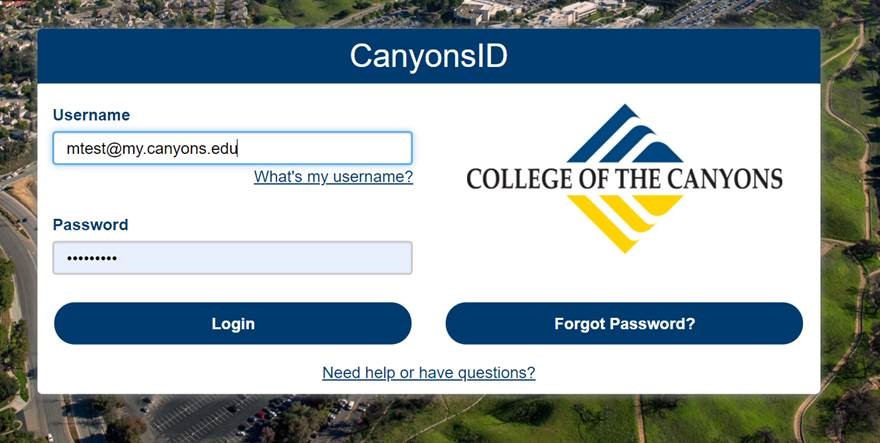
Paso 2: Regístrese en CanyonsID
Cree su cuenta de CanyonsID o restablezca su contraseña
Estudiantes nuevos: revise su correo electrónico y busque el mensaje “Your COC Noncredit Application has been Accepted.” Este mensaje incluye su nombre de usuario de CanyonsID (su correo electrónico estudiantil de COC) y una contraseña temporal. Utilice esta información para crear su cuenta.
Estudiantes que regresan: utilice su cuenta existente de CanyonsID (su correo electrónico estudiantil de COC). Si olvidó su contraseña, haga clic en “Forgot Password” en la página de inicio de sesión para restablecerla.
Haga clic aquí para crear su cuenta o restablecer su contraseña de CanyonsID.
Paso 3: Elija un curso o certificado GRATUITO
Visite www.canyons.edu/FREE para explorar los cursos y programas de certificación GRATUITOS.
Paso 4: Inscríbase en las clases
- Visite www.canyons.edu y haga clic en “Menu.
- Haga clic en el ícono “My Canyons” en la parte superior de la página.
- Inicie sesión con su correo electrónico estudiantil de CanyonsID y su contraseña.
- Seleccione el perfil “Current Student.”
- Haga clic en el ícono “Register for Classes.”
- Haga clic en “Academics” y seleccione “Course Catalog.”
- Seleccione un semestre, a continuación, busca por orden alfabético las asignaturas sin créditos en el menú desplegable “Courses and Sections”. Haga clic en “Search”.
- Haga clic en “Add” y luego en “Add Section.”
- Vaya a “Academics,” seleccione “Student Planning” y haga clic en “Plan Your Degree & Register for Classes.”
- Haga clic en el botón azul “Register” para cada clase que desee agregar a su horario.
Haga clic en “Registration Instructions” para obtener ayuda paso a paso sobre cómo inscribirse en clases GRATUITAS.
Paso 5: Explore Canvas para familiarizarse con su aula virtual
Visite coc.instructure.com para iniciar sesión.
Nota: El contenido del curso no aparecerá hasta que su instructor lo publique, generalmente el primer día de clases.
¿Necesita ayuda para iniciar sesión en Canvas?
Cómo iniciar sesión en Canvas
- Teléfono: (661) 362-3344, de lunes a viernes, de 9:00 a. m. a 5:00 p. m.
- Correo electrónico: cvsupport@canyons.edu o online@canyons.edu
- Asistencia de Canvas las 24 horas, los 7 días de la semana: (877) 889-9052
| Dias | Horarios |
| Viernes | 11:00 AM - 3:00 PM |
Asistencia en línea con inscripción rápida
Podemos ayudarte con el proceso de inscripción, elegir tus cursos y brindarte más información sobre nuestros programas.
| Dias | Horarios |
|
Martes |
3:00 PM - 4:30 PM |
|
Jueves |
3:00 PM - 4:30 PM |
|
Viernes |
11:00 AM- 1:00 PM 2:30 PM - 4:30 PM |
Haga Clic Aqui para ayuda via ZOOM
*Returning Students: students who have previously taken classes at College of the Canyons but have skipped one or more major terms (Fall or Spring)
*Continuing Students: students currently enrolled or who have not skipped a Fall or Spring term since their last term of enrollment
Next, Follow the Instructions for Your Student Status:
*Returning Students: Follow Steps 1–5. You may skip Step 2 if you already have a CanyonsID account and remember your password. If you have forgotten your password, follow Step 2 to reset it.Important: Do not create a new account, as this may cause registration problems.
*Continuing Students: You do not need to submit a new application. Skip directly to Step 4.
Step 1: Submit an Application
Click the blue “Go to OpenCCC” button below to complete your application. After submitting your application, check your email for a message with the subject line “Your COC Noncredit Application has been accepted.”
Go to OpenCCC Step-by-step Instructions
Step 2: Enroll in CanyonsID (single sign-on)
Create or Reset Your CanyonsID
New Students: Check your email for the message “Your COC Noncredit Application has been Accepted.” It includes your CanyonsID username (your COC student email address) and a temporary password. Use this information to create your account.
Returning Students: Use your existing CanyonsID account (your COC student email address). If you forgot your password, click “Forgot Password” on the login page to reset it.
Click here to create account or reset your CanyonsID password.
Step 3: Choose a FREE Course or Certificate
Visit www.canyons.edu/FREE to explore FREE courses and certificate programs.
Step 4: Register for classes
- Visit www.canyons.edu and click Menu.
- Click on the "My Canyons" icon at the top of the page.
- Sign in using your CanyonsID student email and password.
- Select the "Current Student" profile.
- Click on the "Register for Classes" icon.
- Click on “Academics” and select “Course Catalog.”
- Select a term and then search alphabetically for the Noncredit subjects from the "Courses and Sections" drop-down menu. Click "Search."
- Click "Add," then click "Add Section."
- Go to "Academics," then select "Student Planning," and click on "Plan Your Degree & Register for Classes."
- Click the blue "Register" button for each class you want to add to your schedule.
Click on Registration Instructions for "step-by-step" help with enrolling in FREE classes.
Step 5: Explore Canvas to get to know your Online Classroom
Go to coc.instructure.com to log in.
Note: Your course content will not appear until your instructor publishes the course, usually on the first day of class.
Need help logging in to Canvas?
- Phone: (661) 362-3344, Monday–Friday, 9 a.m.–5 p.m.
- Email: cvsupport@canyons.edu or online@canyons.edu
- 24/7 Canvas Support: (877) 889-9052
Use our self-placement tool by clicking the Start ESL Assessment button below. The ESL Assessment is optional, as students may enroll in any course available for registration.
For a list of Noncredit ESL classes check the current Class Schedule under the subject "Noncredit ESL." We offer Noncredit ESL classes from beginner to advanced:
LOW 1A > 1B > 2A > 2B > 3A > 3B > 4A > 4B > 060 > 061 > 070 > 071 HIGH
Cick on the button below, to view the ESL course sequence chart that begins with beginning-level FREE Noncredit classes and ends in the credit program, where courses are more challenging and require tuition fees.

My name is Robin Behbood and I am an Academic Advisor for the Personal and Professional Learning Program. Each day I look forward to meeting with students with a variety of different backgrounds and life experiences. My role is to partner with students in setting both short-term and long-term goals, so they feel they have a support system at the college. It is my pleasure to help students select classes that fit into their daily schedule, assist with the process of transitioning into the credit program and provide resources to explore new job and career possibilities.
With a variety of new classes and certificates being added each semester, it is very exciting to watch all of our students grow and progress. I encourage all students to schedule an appointment with me to discuss how our Free classes can enhance their personal and professional lives.
Contact Info:
Email: robin.behbood@canyons.edu
***OFFICIAL NONCREDIT TRANSCRIPT REQUEST
Official Noncredit Transcript Request Form
For a complete report of all noncredit coursework and hours earned, you may request a free official, sealed transcript. Please allow up to 10 days for processing.
***ENROLLMENT VERIFICATION REQUEST
Enrollment Verification Request Form
If you need proof that you are enrolled in free classes, please complete this electronic Enrollment Verification Request form by clicking the blue button below. Please allow up to 10 business days to process.
***COURSE SUBSTITUTION REQUEST
Course Substitution Request Form
If you took a credit class at College of the Canyons and received a passing grade, and believe it to be an identical course that can be applied toward earning a Noncredit Certificate, you can fill out the Course Substitution Request form. Please complete the form below and submit it to the Noncredit Enrollment Services office in Tutoring and Learning Center-LTLC 168.
***LEARNING PARITY EXEMPTION REQUEST
Learning Parity Exemption Request Form
The District has discretion to exempt a student from completing up to fifty percent of
the District-identified courses, when the student has demonstrated sufficient mastery of the course content delineated in the approved course outline of record ("Learning Parity Exemption" or "LPE").
***COURSE REPEAT REQUEST
If you want to enroll in a course you have already completed within the same term, please fill out the form below and return it to Noncredit Enrollment Services OR scan the completed form to freeclasses@canyons.edu. JPEG images of the form (taken by a smartphone) will not be accepted. Allow 24-48 hours to process. Emails sent during the weekend will be read when staff return on Monday.
***NONCREDIT CERTIFICATE REQUEST
Noncredit Certificate Request Form
Please not that this form should only be completed after you have met and passed all requirements for a Noncredit certificate.
!NOTICE – NEW POLICY UPDATE:
Approved certificate requests will now be processed only after the end of each academic term - Fall, Spring, and Summer, excluding the Winter session. Certificates completed during the Winter term will be processed with the Spring certificates. Please be advised that certificate requests must be submitted by established deadlines.
The deadline for Winter and Spring 2026 has already passed. Any requests for that term or earlier will be processed along with the Summer batch of certificates, after the deadline listed below.
For the Summer 2026 term, the deadline to submit your certificate request is November 2, 2026.
Requests submitted after this date will be processed for the following term, and the date on your certificate will reflect the later term. To avoid delays in receiving your certificate, please be sure to adhere to the established deadlines.
We appreciate your attention to this policy and thank you for your cooperation.
Before submitting a Noncredit Certificate Request, click on the link below and search under the "Programs" heading for a list of certificate titles and course requirements. You must complete all required courses with a passing grade before submitting your certificate request.
https://www.canyons.edu/academics/schools/ppl/
To request your Noncredit certificate, click on the blue button below.
The Noncredit Petition for Late Add is typically used to request enrollment in a course after the standard registration deadline has passed. The description for such a petition should clearly outline the reasons for the late enrollment request and demonstrate that there are valid, exceptional circumstances justifying the delay.
***DEPARTMENT OF REAL ESTATE PRE-LICENSE COURSE COMPLETION REQUEST
Real Estate Pre-license Course Completion Request
If you completed Noncredit Real Estate courses and the California Department of Real Estate (DRE) is requesting the 6-digit approval code for each course in order for you to qualify to sit for the California Real Estate examination, please complete this request form.
Please select all applicable Noncredit Real Estate courses for which you are requesting an approval code.
Please note: This request is separate from the Noncredit Real Estate Certificate. Completing this form does not constitute a request for the Noncredit Real Estate Certificate.
Please allow up to 10 business days for your request to be processed.
|
Locations |
Details |
|---|---|
|
SCV Veterans Collaborative 23681 Newhall Ave, Newhall, CA 91321 |
Visit Date: January, 26th Visit Time: 8:30 AM - 9:30 AM Course Title: Adult and Pediatric CPR, First Aid, and AED Start/End Date: 1/26-1/26 Day: Tuesday Start/End Time: 9:00 AM - 2:00 PM |

Click the booklet above to view current Noncredit course schedules
Phone: 661-362-3304
Email: freeclasses@canyons.edu
Online Express
Drop-in Support
We can assist you with the registration process, help you choose your courses, and provide more information about our programs.| Days | Times |
| Tuesdays | 3:00 PM - 4:30 PM |
| Thursdays | 3:00 PM - 4:30 PM |
| Fridays | 11:00 AM - 1:00 PM 2:30 PM - 4:30 PM |
Join us via ZOOM by clicking here!
Valencia Campus
Office Location: LTLC-168
- Monday - Thursday: 9:00 AM - 5:00 PM
- Friday: 9:00 AM - 1:00 PM
Canyon Country Campus
Office Location: CCSS-203
- Monday: 9:00 AM - 5:00 PM
- Closed for lunch: 1:00 PM - 2:00 PM
ESL Tutoring at
Tutoring and Learning Center (LTLC-126)
Spring ESL Tutoring Schedule
| Days | Times |
| Fridays | 11:00 AM - 3:00 PM |


@ coc_freeclasses